Cloudflare `wrangler deploy --temporary` for AI agents

cloudflarecloudflare-workerswranglerai-agentsagentic-aideveloper-tools+9
Cloudflare Temporary Accounts for AI agents social card
Image: Cloudflare blog / Temporary Accounts announcement (June 19, 2026)

On 2026-06-19, Cloudflare shipped wrangler deploy --temporary — a Wrangler CLI flag that provisions a temporary Cloudflare account, deploys a Worker to a workers.dev URL, and prints a claim URL. No human in the loop. No API token. No OAuth. No Cloudflare account. The deployment stays live for 60 minutes; within that window a human can open the claim URL, sign in or sign up, and convert the temporary account into a permanent one — keeping the Worker and every Cloudflare resource it created (KV, D1, Durable Objects, Hyperdrive, Queues, SSL/TLS). If nobody claims it, Cloudflare deletes the temporary account and its deployments automatically. On 2026-06-21, independent developer Simon Willison confirmed the flow end-to-end with GPT-5.5 xhigh in Codex Desktop, redeploying a redirect-resolver Worker and capturing the claim UI (Cloudflare blog, 2026-06-19; Cloudflare developer docs, 2026-06-19; Simon Willison, 2026-06-21).

This is the most concrete engineering response so far in 2026 to the auth wall that has stalled autonomous deploys — the moment an agent needs to sign up for an account, copy an API token, or satisfy an MFA prompt. It is also, clearly, a Cloudflare product feature, not an industry standard. The rest of this article lays out exactly what shipped, what the limits are, and what to watch.

What happened

The announcement has three parts, all dated.

1. The Cloudflare blog post (2026-06-19). “Temporary Cloudflare Accounts for AI agents” was authored by Sid Chatterjee, Celso Martinho, and Brendan Irvine-Broque at Cloudflare. The post opens with the framing the audience will recognize: “the moment an agent needs to deploy something — and needs to sign up and create an account — it slams face-first into a wall built for humans: a browser-based OAuth flow, a dashboard to click through, an API token to copy-paste, a multi-factor authentication prompt to satisfy.” For an interactive copilot that is annoying; for a background agent it is a hard stop. The post then describes why frictionless temporary accounts matter — background AI sessions with no human in the loop, the trial-and-error loop agents need, and the agent platforms already building their own ways to deploy without extra steps or credentials.

The technical core is the new wrangler deploy --temporary flag. The flow is opt-in for the LLM: when an agent runs wrangler deploy without credentials, the CLI now prints a message suggesting --temporary, so the agent can discover the flag without being told by a human. Cloudflare provisions a temporary account, gives Wrangler an API token to work with, and prints a claim URL the agent can hand back to a human. The claim URL is the durable artifact: clicking it opens a Cloudflare dashboard page where a human can sign in or sign up and convert the temporary account into a permanent one, with the Worker and its resources attached.

2. The Cloudflare developer docs (page last modified 2026-06-19). “Claim deployments (temporary accounts)” is the canonical reference. The page documents the full flow, the supported-products table (reproduced below), the limits, the abuse-prevention posture, and the relationship to wrangler login / CLOUDFLARE_API_TOKEN for production. The page also makes explicit that the feature is exclusively for the unauthenticated path: --temporary returns an error if the CLI can already use OAuth, CLOUDFLARE_API_TOKEN, or a global API key.

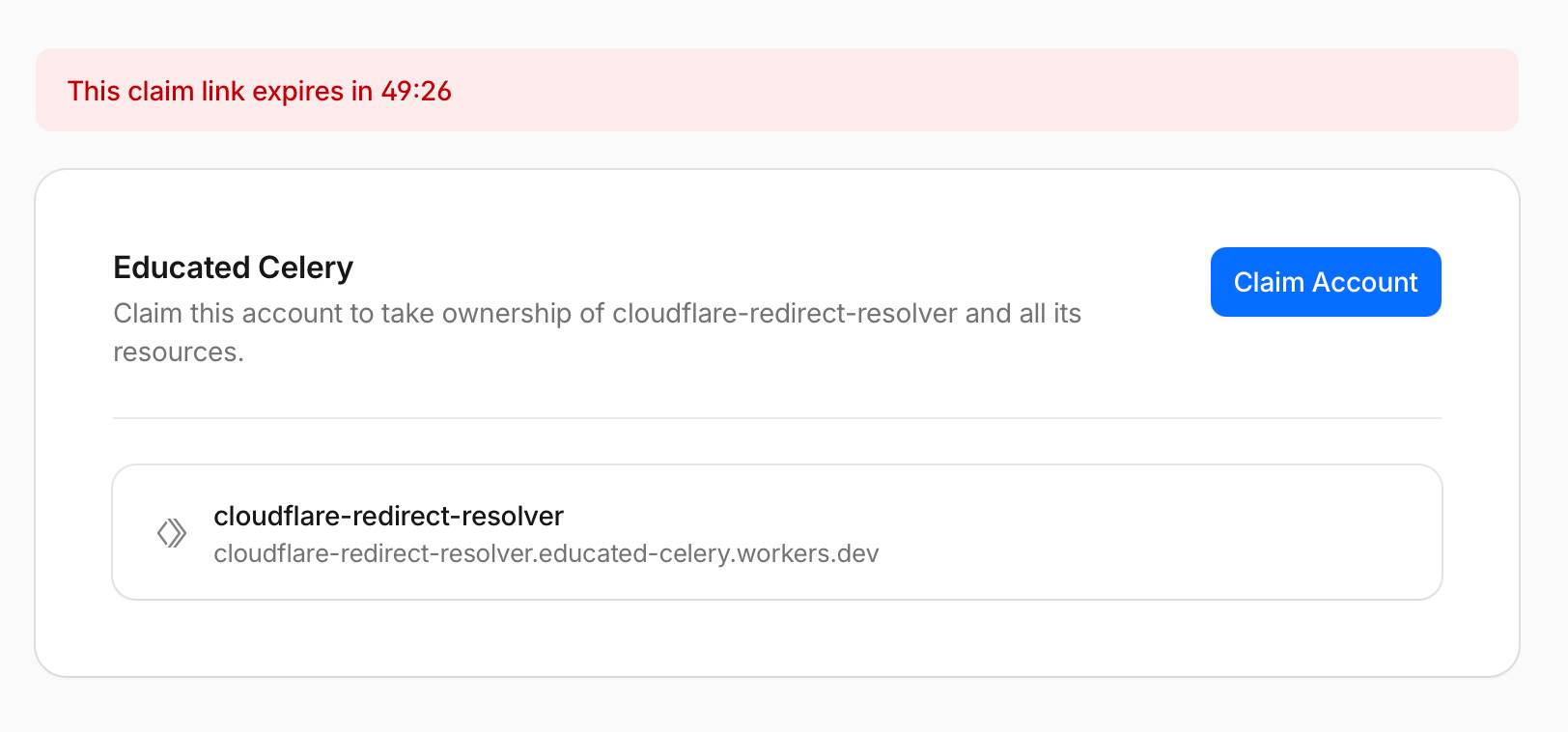
3. Simon Willison’s independent test (2026-06-21). On his web log, Simon Willison tested the flow with GPT-5.5 xhigh in Codex Desktop. He had the agent build and deploy a cloudflare-redirect-resolver Worker — a tool for following HTTP redirects and returning the final destination. His verdict: “The temporary deployment worked as advertised.” He also flagged the boundary in his own write-up: “the AI hook isn’t really necessary, this is an interesting feature for everyone else as well.” The point matters: --temporary is genuinely useful for human developers who want to spin up a quick prototype on a fresh Cloudflare account without going through the dashboard, and the article should not frame it as exclusively an agent feature. Simon’s claim-UI screenshot shows the account-claim page with a 49:26 countdown timer and a “Claim Account” button.

The four-step flow from the developer docs. Concretely, the documented flow is:

  1. Install or update Wrangler to 4.102.0 or later (install-and-update docs).
  2. Give an agent a deploy prompt — for example, “Make a very simple Hello World Cloudflare Worker in TypeScript and deploy it using the Wrangler CLI. Do not ask me questions.”
  3. The agent runs wrangler deploy. With no credentials, the CLI prints output similar to:

    To continue without logging in, rerun this command with --temporary. Wrangler will use a temporary account and print a claim URL.

  4. The agent reruns the deploy with npx wrangler deploy --temporary (or yarn wrangler deploy --temporary / pnpm wrangler deploy --temporary). The CLI prints output similar to:

    Continuing means you accept Cloudflare’s Terms of Service and Privacy Policy. Temporary account ready: Account: example-name (created) Claim within: 60 minutes Claim URL: https://dash.cloudflare.com/claim-preview?claimToken=<TOKEN> Uploaded example-worker Deployed example-worker triggers https://example-worker.example-name.workers.dev

Within the 60-minute window, Wrangler caches the temporary account and reuses it for subsequent wrangler deploy --temporary runs — so the agent can iterate on a Worker and verify changes in one session. The cache is cleared by wrangler login or wrangler logout. The 60-minute clock starts at account creation; Cloudflare deletes the temporary account and all its deployments if it is not claimed.

Supported products and limits. As of 2026-06-19 the temporary preview account supports the following Cloudflare products only (Cloudflare developer docs):

Supported product or resource Temporary preview account limit
Workers Deployments on workers.dev
Workers Static Assets Up to 1,000 files, with each asset up to 5 MiB
Workers KV Commands that use temporary credentials
D1 One database, with up to 100 MB per database and 100 MB total
Durable Objects Commands that use temporary credentials
Hyperdrive Up to two database configurations and 10 connections
Queues Up to 10 queues
SSL/TLS certificates Commands that use temporary credentials

Cloudflare’s exact framing: “Cloudflare will add support for more products over time.” Anything outside this list is not yet supported via --temporary; production deploys of those products still go through wrangler login or CLOUDFLARE_API_TOKEN.

The non-obvious limits. The docs call out four behaviors that are easy to miss:

  1. Proof-of-work. Before Wrangler creates a temporary preview account, Cloudflare requires a proof-of-work check. The CLI handles this automatically. It can add a short delay, but does not require extra input.
  2. Rate limits. Cloudflare limits how quickly you can create temporary preview accounts. If the CLI cannot create an account because too many temporary preview accounts were requested too quickly, the documented advice is to wait before retrying or authenticate the CLI with a permanent Cloudflare account. Real workloads that hit this rate limit will fail quietly, and the article should flag that the limits are not published numerically.
  3. Abuse prevention. “Cloudflare applies additional abuse prevention checks to temporary preview accounts.” The checks are not specified. Agents that trip them will be silently rate-limited or blocked; the article should not promise universal availability.
  4. Claim URLs are sensitive. The docs state it directly: “Claim URLs grant ownership of the temporary preview account. Treat them as sensitive.” The token in the URL is the credential; leaking it is equivalent to handing over the temporary account.

Why it matters

Three reasons this is worth a builder-reader’s attention.

1. The auth wall is the single biggest visible blocker for autonomous agents in 2026. Browser-based OAuth flows, copy-paste of API tokens, and MFA prompts stop background agents cold. Cloudflare’s framing — “the moment an agent needs to deploy something… it slams face-first into a wall built for humans” — is the right diagnosis, and the builder reader has hit it in their own stacks. The --temporary flag is the first widely-deployed CLI-level response from a major platform that does not require the agent to discover a custom protocol, a vendor partnership, or a paid auth product. The article should not overstate it — Vercel, Netlify, Render, Fly, and Railway do not have public --temporary-equivalent flags as of 2026-06-22 — but it is a real first-mover step in the right direction.

2. Tight write → deploy → verify loops are essential for agent productivity. Cloudflare’s argument, validated by Simon Willison’s test, is that an agent can write code, deploy, curl the result, and verify the output in a single session without any human interaction. The blog post shows the agent iterating on “hello world” → “hello cloudflare” with the same temporary account, and Simon’s test produced a working redirect-resolver Worker in a single Codex Desktop session. For readers running or building agent harnesses, this is the workflow they actually want — deploy a draft, see if it works, fix it, redeploy, verify, all without paging a human.

3. The industry is converging on a few specific patterns, and --temporary is one of them. The blog post references the Cloudflare + Stripe partnership for provisioning Cloudflare on behalf of users (account creation, subscription, domain registration, API token — without copy-pasted credentials or credit-card entry) and the WorkOS auth.md collaboration (OAuth-based agent provisioning). Each of these is a different shape of the same problem: how does an agent get credentials in a world built for humans? Cloudflare’s --temporary is a CLI-level provisioning shortcut; WorkOS’s auth.md is an OAuth-based provisioning protocol; Cloudflare’s Stripe partnership handles billing. None is an industry standard yet, but they are the building blocks of a near-term convention. The article should position the temporary-accounts announcement as part of this pattern, not a one-off.

Practical implications

For practitioners, four concrete takeaways.

Risks and caveats

The brief’s flag is highRiskClaims: false: this is a vendor product feature, not a security incident, regulatory matter, or contested claim. The risks are framing-level, and the article must keep the lines clearly drawn.

  1. This is a Cloudflare product, not an industry standard. The article must not frame --temporary as the canonical pattern. It is the first widely-deployed CLI-level example; no other major platform has shipped an equivalent public flag as of 2026-06-22.
  2. The 60-minute TTL is short for some real workloads. If an agent’s session stretches past an hour (long-running training, multi-day batch jobs, anything that needs a persistent deployment), the temporary account will be reclaimed and the deployment deleted. The article must surface this limit, not bury it.
  3. Supported products and limits are narrow. The 2026-06-19 docs limit D1 to one database, KV and Durable Objects to commands that use temporary credentials, Hyperdrive to two database configurations, and Queues to ten. The article must not imply the feature is production-ready for every Cloudflare product. The narrow support list is the truth.
  4. Claim URLs grant ownership of the temporary account. Treat them as sensitive credentials. The article includes this security caveat explicitly because the developer docs call it out: “Claim URLs grant ownership of the temporary preview account. Treat them as sensitive.”
  5. Abuse prevention is opaque. Cloudflare’s docs mention “additional abuse prevention checks” and a proof-of-work step before account creation, without specifying the checks or the rate-limit thresholds. Agents that trip these will be silently rate-limited; the article should flag this rather than promising universal availability.
  6. Simon Willison’s test is a single user, single model, single project. Generalization from one test is a classic pitfall. Attribute the result to Simon’s test with GPT-5.5 xhigh in Codex Desktop, link the gist and the cloudflare-redirect-resolver repo, and do not extrapolate.
  7. Cloudflare’s existing authentication is still required for production. The blog and docs both make clear that --temporary is not for production or CI/CD with existing Cloudflare accounts; the production path is wrangler login or CLOUDFLARE_API_TOKEN.
  8. “For AI agents” is partly marketing. Simon’s own write-up flags this: “the AI hook isn’t really necessary, this is an interesting feature for everyone else as well.” The article does not imply the feature is exclusively for AI agents.

What to watch

Five follow-up signals to track.

  1. Whether other platforms ship equivalent features. Vercel, Netlify, Render, Fly, and Railway do not have a public --temporary-equivalent flag as of 2026-06-22. The first major competitor to match this — and the rough shape of the matching feature (CLI flag vs. dashboard shortcut vs. protocol) — is a meaningful signal for whether the pattern spreads.
  2. Adoption in agent frameworks. Whether Claude Code, Codex, Cursor, Aider, and the open-source agent harnesses (DeerFlow, smolagents, and similar) recognise --temporary in their deploy heuristics. Simon Willison’s GPT-5.5 test confirms the LLM-side already discovers the flag from the CLI’s own message; framework-level integration is the next step.
  3. Expansion of supported products and limits. The 2026-06-19 docs limit D1 to one database, KV to temporary credentials, Hyperdrive to two configurations, and Queues to ten. Whether Cloudflare expands this list — and on what timeline — is a direct measure of how production-ready the feature becomes.
  4. Abuse and rate-limit behaviour at scale. The docs warn about rate limits and additional abuse checks. If real workloads hit these in production, the article’s “frictionless” framing will need a follow-up that names the threshold and the workaround.
  5. Convergence with WorkOS auth.md and the Cloudflare + Stripe partnership. The blog explicitly teases these as related moves. The combined “agent signs up, pays, deploys” loop is the practical end state. Whether the three pieces (CLI-level temporary accounts, OAuth-based provisioning via auth.md, billing via Stripe) compose into a single agent-ready path is the multi-quarter story.

Sources

Live-verified 2026-06-22.

Primary

Secondary